> ## Documentation Index
> Fetch the complete documentation index at: https://docs.trytrellis.app/llms.txt
> Use this file to discover all available pages before exploring further.
# How It Works
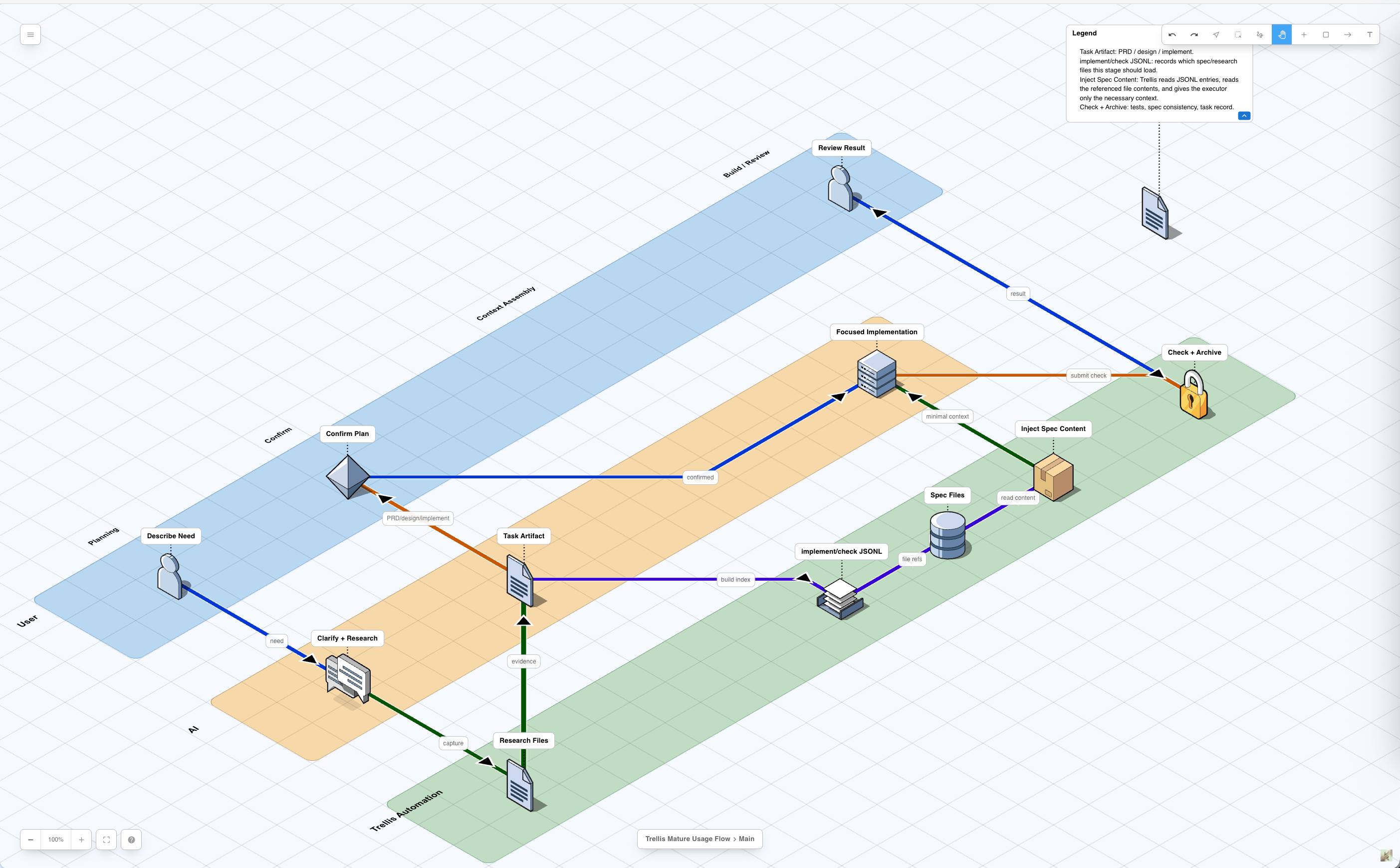
This page walks through the normal Trellis flow from a fresh AI session to an
archived task. It focuses on runtime behavior: which files are read, which files
are written, which hooks run, and where platform behavior differs.
> This is the day-to-day usage flow. For module boundaries, customization
> points, and implementation details, see [Architecture Overview](/advanced/architecture).
## Flow overview
 ## 1. A session opens
A Trellis project is a repository with `.trellis/` plus one or more platform
directories such as `.claude/`, `.codex/`, `.cursor/`, `.opencode/`, `.kiro/`,
or `.pi/`.
On platforms with a SessionStart path, Trellis injects a compact startup
payload. It is an index and state report, not a full dump of every workflow,
spec, or task artifact.
Typical startup context includes:
| Context | Source |
| ------------------- | ----------------------------------------------------------------------------------------------------------------------- |
| Developer identity | `.trellis/.developer` |
| Git state | current branch, dirty files, recent commits |
| Active task pointer | `.trellis/.runtime/sessions/.json`, with a single-session fallback when exactly one runtime session exists |
| Active task list | `.trellis/tasks/*/task.json` |
| Workflow index | compact Phase Index from `.trellis/workflow.md` |
| Spec index paths | `.trellis/spec/**/index.md` paths |
| Workspace memory | `.trellis/workspace//index.md` and recent journal notes |
The delivery path depends on the platform:
| Platform group | Startup behavior |
| ---------------------------------------------------------------------- | --------------------------------------------------------------------------------------------------------------------------------------------------------------------- |
| Claude Code, Cursor, OpenCode, Gemini CLI, Qoder, CodeBuddy, Droid, Pi | A SessionStart hook, plugin, or extension injects compact startup context automatically. |
| Codex | `AGENTS.md` loads automatically. Trellis installs a `UserPromptSubmit` hook; on no-task turns it can inject a `` reminder to read `trellis-start`. |
| Copilot | SessionStart output is diagnostic-only in current Copilot hosts. Trellis relies on prompt hooks and skill files for model-visible context. |
| Kiro | Trellis content is delivered through `.kiro/` skills and agent files; there is no Trellis SessionStart hook by default. |
| Kilo, Antigravity, Devin | The main session reads a workflow or skill entry explicitly. |
After this step, the AI should know where Trellis context lives. Detailed phase
instructions are loaded on demand through workflow-state breadcrumbs, skills, or
`get_context.py`.
## 2. Each prompt gets the current workflow state
On hook-capable platforms, every user message triggers a lightweight
workflow-state injection. This is the per-turn guardrail that keeps the main
session aligned with the current task status.
The hook resolves the active task for the current session:
```text theme={null}
cwd
-> find .trellis/
-> resolve session key
-> read .trellis/.runtime/sessions/.json
-> read .trellis/tasks//task.json
-> read task.json.status
```
Then it parses `.trellis/workflow.md` for the matching block:
```text theme={null}
[workflow-state:STATUS]
...
[/workflow-state:STATUS]
```
The block body is wrapped in `...` and injected
into the current turn. SessionStart workflow summaries use the
`` tag.
Important details:
* The hook is parser-only. Breadcrumb wording lives in `.trellis/workflow.md`.
* Python and JavaScript hooks do not carry duplicated fallback dictionaries.
* If no active task exists, the pseudo-status is `no_task`.
* If a matching block is missing, the hook emits `Refer to workflow.md for current step.`
* Codex also receives a `` banner when `codex.dispatch_mode` changes implementation routing.
Changing workflow-state behavior starts with `.trellis/workflow.md`, not the
hook script.
## 3. Trellis triages the current turn
When there is no active task, the AI first classifies the current turn and asks
for task-creation consent before creating anything under `.trellis/tasks/`.
| Route | When it applies | What the AI asks |
| ------------------- | ---------------------------------------------------------------------------------- | --------------------------------------------------------------------------------------------------------------------------------------------------------- |
| Simple conversation | No repo writes; simple Q\&A, explanation, lookup, or discussion | No task by default. If a task might help, ask only whether this turn should create a Trellis task. |
| Inline small task | A small contained edit that can be understood and verified in the current turn | Ask only whether this turn should create a Trellis task. If the user says no, skip Trellis for this turn and continue inline. |
| Full Trellis task | Multi-file work, workflow/spec/platform changes, template generation, durable plan | Explain why a task is useful and ask whether Trellis may create a task and enter planning. If the user says no, clarify scope or suggest a smaller split. |
User consent to create a task is not consent to start implementation. Starting
implementation has a separate planning review gate.
## 4. Task creation writes the planning state
When the user consents, the main session creates a task:
```bash theme={null}
python3 ./.trellis/scripts/task.py create "" --slug <name>
```
This command writes a task directory:
```text theme={null}
.trellis/tasks/<MM-DD-name>/
├── task.json
├── prd.md
├── implement.jsonl
└── check.jsonl
```
`prd.md` is always created from the default template. `implement.jsonl` and
`check.jsonl` may be seeded for sub-agent-capable platforms. `design.md` and
`implement.md` are not created by the script; the AI writes them during planning
when the task is complex enough to need them.
The initial `task.json` status is `planning`. `task.py create` also best-effort
sets the current session's active-task pointer, so the next prompt can receive
the `[workflow-state:planning]` block without waiting for `task.py start`.
## 5. Planning writes the right artifacts
Planning converts the request into files that implementation and review can
trust.
| Artifact | Required when | Purpose |
| ----------------- | --------------------------- | --------------------------------------------------------------------------------------- |
| `prd.md` | every task | Requirements, constraints, acceptance criteria, and out-of-scope items. |
| `design.md` | complex tasks | Technical design: boundaries, contracts, data flow, compatibility, tradeoffs, rollback. |
| `implement.md` | complex tasks | Execution plan: ordered checklist, validation commands, review gates, rollback points. |
| `research/*.md` | when investigation matters | Durable facts discovered during planning. |
| `implement.jsonl` | when context manifests help | Spec/research files for implementation context. |
| `check.jsonl` | when context manifests help | Spec/research files for review and verification context. |
`implement.md` does not replace `implement.jsonl`. The markdown file is the
human-readable plan; the JSONL file is a manifest for stable context files.
Lightweight tasks can be PRD-only. Complex tasks need `prd.md`, `design.md`, and
`implement.md` before they can start.
## 6. Context manifests stay narrow
`implement.jsonl` and `check.jsonl` list stable context files to read before
implementation or review.
```jsonl theme={null}
{"file": ".trellis/spec/docs-site/docs/style-guide.md", "reason": "Docs writing style"}
{"file": ".trellis/tasks/04-30-example/research/platforms.md", "reason": "Platform behavior research"}
```
Rules:
* Include spec files and task research files.
* Do not list source files that are about to be modified.
* Do not leave only the seed `_example` row when a sub-agent needs context.
* Put implementation-writing context in `implement.jsonl`.
* Put verification and quality context in `check.jsonl`.
Inline modes can skip JSONL curation when the main session directly reads the
needed artifacts and specs.
## 7. Activation enters implementation
After artifact review, Trellis activates the task:
```bash theme={null}
python3 ./.trellis/scripts/task.py start <task-dir>
```
This changes `task.json.status` from `planning` to `in_progress`.
On the next prompt, the workflow-state hook injects the matching
`[workflow-state:in_progress]` block. That block covers implementation, check,
spec update, commit planning, and finish-work routing.
## 8. Implementation reads task artifacts and specs
Execution always starts from the active task directory. The platform decides how
context gets into the actor doing the work.
| Execution path | Platforms | How context loads |
| ----------------------- | --------------------------------------------------- | ------------------------------------------------------------------------------------------------------------------------------------------------- |
| Hook-push sub-agent | Claude Code, Cursor, OpenCode, CodeBuddy, Droid, Pi | A hook injects JSONL entries, then `prd.md`, `design.md` if present, and `implement.md` if present before the sub-agent starts. |
| Pull-prelude sub-agent | Codex, Copilot, Gemini CLI, Qoder, Kiro | The sub-agent definition tells the agent to read the active task, JSONL entries, `prd.md`, `design.md` if present, and `implement.md` if present. |
| Main-session skill flow | Codex inline, Kilo, Antigravity, Devin | The main session loads Trellis skills and reads `prd.md`, optional artifacts, and relevant specs inline. |
The shared context order is:
```text theme={null}
jsonl entries -> prd.md -> design.md if present -> implement.md if present
```
Codex can run in two modes:
| Mode | Meaning |
| ----------- | ----------------------------------------------------------------------------------------------------------------------------------------- |
| `inline` | The main session implements and checks directly; it does not dispatch implement/check sub-agents. |
| `sub-agent` | Implement/check work defaults to Trellis sub-agents; the main session still coordinates, clarifies, updates specs, commits, and finishes. |
## 9. Check reviews and self-fixes
After implementation, Trellis runs `trellis-check`.
The check path reads:
* `prd.md`
* `design.md` if present
* `implement.md` if present
* `check.jsonl` entries when present
* relevant specs and research
* the changed files
* local test, lint, type-check, or format commands
The goal is not only to report issues. `trellis-check` is allowed to fix
findings directly, then rerun checks.
## 10. Finish updates durable knowledge
After checks pass, the main session performs final verification and loads
`trellis-update-spec`.
This step asks whether the task taught a reusable rule. If yes, the rule is
written into `.trellis/spec/` so future tasks can load it through JSONL or direct
skill context.
Task-local facts stay in `.trellis/tasks/<task>/`; stable team rules move to
`.trellis/spec/`.
## 11. The main session drives the work commit
The commit boundary is separate from implementation and separate from
`/trellis:finish-work`.
In Phase 3.4, the main session:
1. Reads `git status --porcelain`.
2. Separates files changed in this task from unrelated dirty files.
3. Groups task files into logical commits.
4. Prints the proposed commit plan.
5. Waits for one user confirmation.
6. Runs `git add` and `git commit` for the approved batches.
For docs-site changes, there is often a submodule boundary:
1. Commit inside `docs-site/`.
2. Return to the parent repository.
3. Commit the updated `docs-site` submodule pointer.
## 12. `/trellis:finish-work` archives and journals
Only after the work commit exists should `/trellis:finish-work` run.
`/trellis:finish-work` does bookkeeping:
* classifies dirty paths and stops if current-task work is still uncommitted
* archives the task under `.trellis/tasks/archive/YYYY-MM/`
* appends the session summary to `.trellis/workspace/<developer>/journal-N.md`
* updates workspace indexes
It is not the command that commits feature code.
## What survives the session
After the flow completes, durable state lives in files:
| Stored in | What survives |
| --------------------------------- | ---------------------------------------------------------------------------------------------- |
| `.trellis/tasks/<task>/` | PRD, design, implementation plan, research, context manifests, metadata, and archived history. |
| `.trellis/spec/` | Team conventions and reusable lessons. |
| `.trellis/workspace/<developer>/` | Developer journals and cross-session notes. |
| Git commits | Reviewable units of code, docs, spec, archive, and journal changes. |
The next AI session reads the repository state again. It does not need the
previous chat transcript to know what the task was, what specs apply, or what
workflow step comes next.
## 1. A session opens
A Trellis project is a repository with `.trellis/` plus one or more platform
directories such as `.claude/`, `.codex/`, `.cursor/`, `.opencode/`, `.kiro/`,
or `.pi/`.
On platforms with a SessionStart path, Trellis injects a compact startup
payload. It is an index and state report, not a full dump of every workflow,
spec, or task artifact.
Typical startup context includes:
| Context | Source |
| ------------------- | ----------------------------------------------------------------------------------------------------------------------- |
| Developer identity | `.trellis/.developer` |
| Git state | current branch, dirty files, recent commits |
| Active task pointer | `.trellis/.runtime/sessions/.json`, with a single-session fallback when exactly one runtime session exists |
| Active task list | `.trellis/tasks/*/task.json` |
| Workflow index | compact Phase Index from `.trellis/workflow.md` |
| Spec index paths | `.trellis/spec/**/index.md` paths |
| Workspace memory | `.trellis/workspace//index.md` and recent journal notes |
The delivery path depends on the platform:
| Platform group | Startup behavior |
| ---------------------------------------------------------------------- | --------------------------------------------------------------------------------------------------------------------------------------------------------------------- |
| Claude Code, Cursor, OpenCode, Gemini CLI, Qoder, CodeBuddy, Droid, Pi | A SessionStart hook, plugin, or extension injects compact startup context automatically. |
| Codex | `AGENTS.md` loads automatically. Trellis installs a `UserPromptSubmit` hook; on no-task turns it can inject a `` reminder to read `trellis-start`. |
| Copilot | SessionStart output is diagnostic-only in current Copilot hosts. Trellis relies on prompt hooks and skill files for model-visible context. |
| Kiro | Trellis content is delivered through `.kiro/` skills and agent files; there is no Trellis SessionStart hook by default. |
| Kilo, Antigravity, Devin | The main session reads a workflow or skill entry explicitly. |
After this step, the AI should know where Trellis context lives. Detailed phase
instructions are loaded on demand through workflow-state breadcrumbs, skills, or
`get_context.py`.
## 2. Each prompt gets the current workflow state
On hook-capable platforms, every user message triggers a lightweight
workflow-state injection. This is the per-turn guardrail that keeps the main
session aligned with the current task status.
The hook resolves the active task for the current session:
```text theme={null}
cwd
-> find .trellis/
-> resolve session key
-> read .trellis/.runtime/sessions/.json
-> read .trellis/tasks//task.json
-> read task.json.status
```
Then it parses `.trellis/workflow.md` for the matching block:
```text theme={null}
[workflow-state:STATUS]
...
[/workflow-state:STATUS]
```
The block body is wrapped in `...` and injected
into the current turn. SessionStart workflow summaries use the
`` tag.
Important details:
* The hook is parser-only. Breadcrumb wording lives in `.trellis/workflow.md`.
* Python and JavaScript hooks do not carry duplicated fallback dictionaries.
* If no active task exists, the pseudo-status is `no_task`.
* If a matching block is missing, the hook emits `Refer to workflow.md for current step.`
* Codex also receives a `` banner when `codex.dispatch_mode` changes implementation routing.
Changing workflow-state behavior starts with `.trellis/workflow.md`, not the
hook script.
## 3. Trellis triages the current turn
When there is no active task, the AI first classifies the current turn and asks
for task-creation consent before creating anything under `.trellis/tasks/`.
| Route | When it applies | What the AI asks |
| ------------------- | ---------------------------------------------------------------------------------- | --------------------------------------------------------------------------------------------------------------------------------------------------------- |
| Simple conversation | No repo writes; simple Q\&A, explanation, lookup, or discussion | No task by default. If a task might help, ask only whether this turn should create a Trellis task. |
| Inline small task | A small contained edit that can be understood and verified in the current turn | Ask only whether this turn should create a Trellis task. If the user says no, skip Trellis for this turn and continue inline. |
| Full Trellis task | Multi-file work, workflow/spec/platform changes, template generation, durable plan | Explain why a task is useful and ask whether Trellis may create a task and enter planning. If the user says no, clarify scope or suggest a smaller split. |
User consent to create a task is not consent to start implementation. Starting
implementation has a separate planning review gate.
## 4. Task creation writes the planning state
When the user consents, the main session creates a task:
```bash theme={null}
python3 ./.trellis/scripts/task.py create "" --slug <name>
```
This command writes a task directory:
```text theme={null}
.trellis/tasks/<MM-DD-name>/
├── task.json
├── prd.md
├── implement.jsonl
└── check.jsonl
```
`prd.md` is always created from the default template. `implement.jsonl` and
`check.jsonl` may be seeded for sub-agent-capable platforms. `design.md` and
`implement.md` are not created by the script; the AI writes them during planning
when the task is complex enough to need them.
The initial `task.json` status is `planning`. `task.py create` also best-effort
sets the current session's active-task pointer, so the next prompt can receive
the `[workflow-state:planning]` block without waiting for `task.py start`.
## 5. Planning writes the right artifacts
Planning converts the request into files that implementation and review can
trust.
| Artifact | Required when | Purpose |
| ----------------- | --------------------------- | --------------------------------------------------------------------------------------- |
| `prd.md` | every task | Requirements, constraints, acceptance criteria, and out-of-scope items. |
| `design.md` | complex tasks | Technical design: boundaries, contracts, data flow, compatibility, tradeoffs, rollback. |
| `implement.md` | complex tasks | Execution plan: ordered checklist, validation commands, review gates, rollback points. |
| `research/*.md` | when investigation matters | Durable facts discovered during planning. |
| `implement.jsonl` | when context manifests help | Spec/research files for implementation context. |
| `check.jsonl` | when context manifests help | Spec/research files for review and verification context. |
`implement.md` does not replace `implement.jsonl`. The markdown file is the
human-readable plan; the JSONL file is a manifest for stable context files.
Lightweight tasks can be PRD-only. Complex tasks need `prd.md`, `design.md`, and
`implement.md` before they can start.
## 6. Context manifests stay narrow
`implement.jsonl` and `check.jsonl` list stable context files to read before
implementation or review.
```jsonl theme={null}
{"file": ".trellis/spec/docs-site/docs/style-guide.md", "reason": "Docs writing style"}
{"file": ".trellis/tasks/04-30-example/research/platforms.md", "reason": "Platform behavior research"}
```
Rules:
* Include spec files and task research files.
* Do not list source files that are about to be modified.
* Do not leave only the seed `_example` row when a sub-agent needs context.
* Put implementation-writing context in `implement.jsonl`.
* Put verification and quality context in `check.jsonl`.
Inline modes can skip JSONL curation when the main session directly reads the
needed artifacts and specs.
## 7. Activation enters implementation
After artifact review, Trellis activates the task:
```bash theme={null}
python3 ./.trellis/scripts/task.py start <task-dir>
```
This changes `task.json.status` from `planning` to `in_progress`.
On the next prompt, the workflow-state hook injects the matching
`[workflow-state:in_progress]` block. That block covers implementation, check,
spec update, commit planning, and finish-work routing.
## 8. Implementation reads task artifacts and specs
Execution always starts from the active task directory. The platform decides how
context gets into the actor doing the work.
| Execution path | Platforms | How context loads |
| ----------------------- | --------------------------------------------------- | ------------------------------------------------------------------------------------------------------------------------------------------------- |
| Hook-push sub-agent | Claude Code, Cursor, OpenCode, CodeBuddy, Droid, Pi | A hook injects JSONL entries, then `prd.md`, `design.md` if present, and `implement.md` if present before the sub-agent starts. |
| Pull-prelude sub-agent | Codex, Copilot, Gemini CLI, Qoder, Kiro | The sub-agent definition tells the agent to read the active task, JSONL entries, `prd.md`, `design.md` if present, and `implement.md` if present. |
| Main-session skill flow | Codex inline, Kilo, Antigravity, Devin | The main session loads Trellis skills and reads `prd.md`, optional artifacts, and relevant specs inline. |
The shared context order is:
```text theme={null}
jsonl entries -> prd.md -> design.md if present -> implement.md if present
```
Codex can run in two modes:
| Mode | Meaning |
| ----------- | ----------------------------------------------------------------------------------------------------------------------------------------- |
| `inline` | The main session implements and checks directly; it does not dispatch implement/check sub-agents. |
| `sub-agent` | Implement/check work defaults to Trellis sub-agents; the main session still coordinates, clarifies, updates specs, commits, and finishes. |
## 9. Check reviews and self-fixes
After implementation, Trellis runs `trellis-check`.
The check path reads:
* `prd.md`
* `design.md` if present
* `implement.md` if present
* `check.jsonl` entries when present
* relevant specs and research
* the changed files
* local test, lint, type-check, or format commands
The goal is not only to report issues. `trellis-check` is allowed to fix
findings directly, then rerun checks.
## 10. Finish updates durable knowledge
After checks pass, the main session performs final verification and loads
`trellis-update-spec`.
This step asks whether the task taught a reusable rule. If yes, the rule is
written into `.trellis/spec/` so future tasks can load it through JSONL or direct
skill context.
Task-local facts stay in `.trellis/tasks/<task>/`; stable team rules move to
`.trellis/spec/`.
## 11. The main session drives the work commit
The commit boundary is separate from implementation and separate from
`/trellis:finish-work`.
In Phase 3.4, the main session:
1. Reads `git status --porcelain`.
2. Separates files changed in this task from unrelated dirty files.
3. Groups task files into logical commits.
4. Prints the proposed commit plan.
5. Waits for one user confirmation.
6. Runs `git add` and `git commit` for the approved batches.
For docs-site changes, there is often a submodule boundary:
1. Commit inside `docs-site/`.
2. Return to the parent repository.
3. Commit the updated `docs-site` submodule pointer.
## 12. `/trellis:finish-work` archives and journals
Only after the work commit exists should `/trellis:finish-work` run.
`/trellis:finish-work` does bookkeeping:
* classifies dirty paths and stops if current-task work is still uncommitted
* archives the task under `.trellis/tasks/archive/YYYY-MM/`
* appends the session summary to `.trellis/workspace/<developer>/journal-N.md`
* updates workspace indexes
It is not the command that commits feature code.
## What survives the session
After the flow completes, durable state lives in files:
| Stored in | What survives |
| --------------------------------- | ---------------------------------------------------------------------------------------------- |
| `.trellis/tasks/<task>/` | PRD, design, implementation plan, research, context manifests, metadata, and archived history. |
| `.trellis/spec/` | Team conventions and reusable lessons. |
| `.trellis/workspace/<developer>/` | Developer journals and cross-session notes. |
| Git commits | Reviewable units of code, docs, spec, archive, and journal changes. |
The next AI session reads the repository state again. It does not need the
previous chat transcript to know what the task was, what specs apply, or what
workflow step comes next.