

This is the day-to-day usage flow. For module boundaries, customization points, and implementation details, see Architecture Overview.
Flow overview
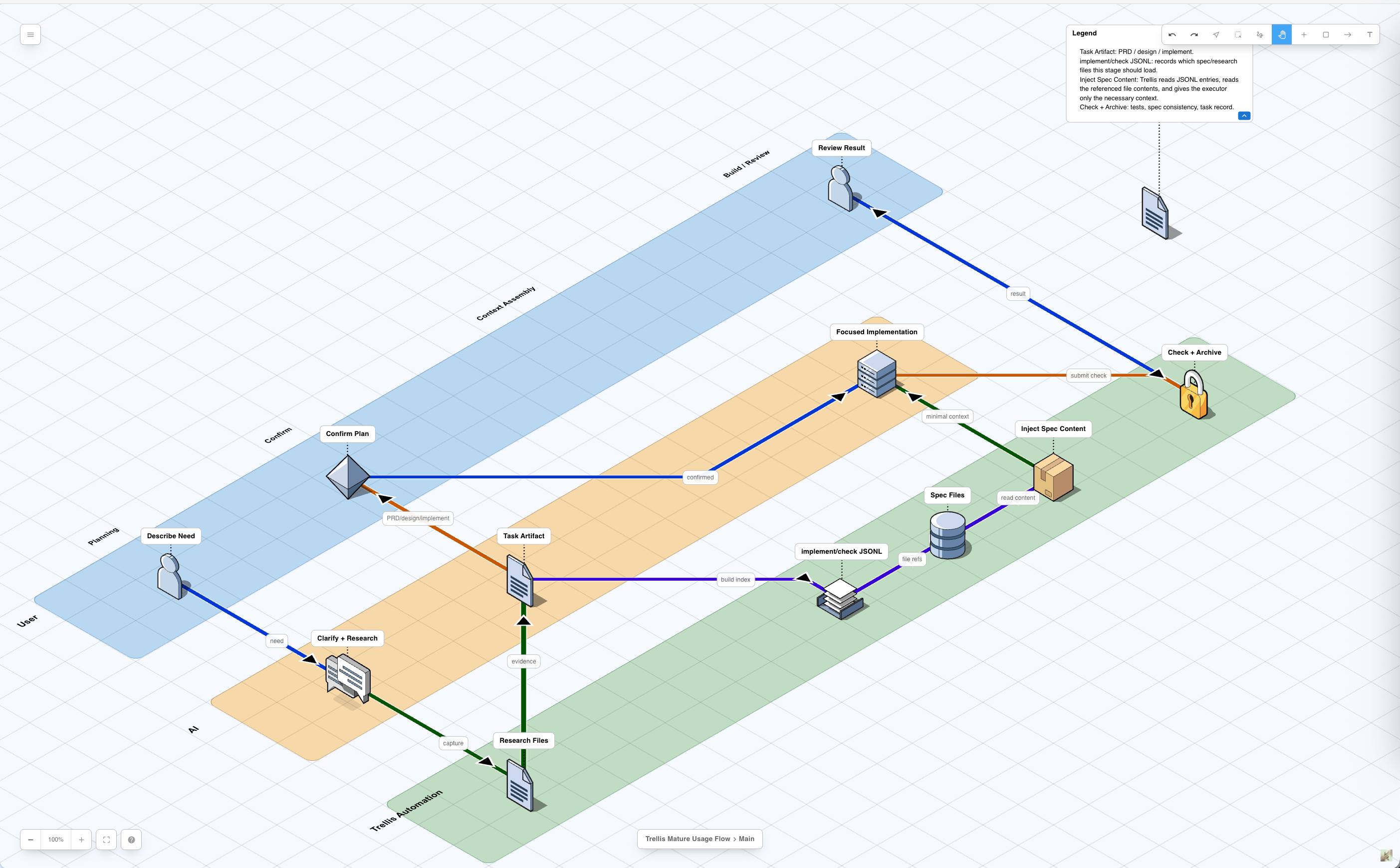
1. A session opens
A Trellis project is a repository with.trellis/ plus one or more platform
directories such as .claude/, .codex/, .cursor/, .opencode/, .kiro/,
or .pi/.
On platforms with a SessionStart path, Trellis injects a compact startup
payload. It is an index and state report, not a full dump of every workflow,
spec, or task artifact.
Typical startup context includes:
The delivery path depends on the platform:
After this step, the AI should know where Trellis context lives. Detailed phase
instructions are loaded on demand through workflow-state breadcrumbs, skills, or
get_context.py.
2. Each prompt gets the current workflow state
On hook-capable platforms, every user message triggers a lightweight workflow-state injection. This is the per-turn guardrail that keeps the main session aligned with the current task status. The hook resolves the active task for the current session:.trellis/workflow.md for the matching block:
<workflow-state>...</workflow-state> and injected
into the current turn. SessionStart workflow summaries use the
<trellis-workflow> tag.
Important details:
- The hook is parser-only. Breadcrumb wording lives in
.trellis/workflow.md. - Python and JavaScript hooks do not carry duplicated fallback dictionaries.
- If no active task exists, the pseudo-status is
no_task. - If a matching block is missing, the hook emits
Refer to workflow.md for current step. - Codex also receives a
<codex-mode>banner whencodex.dispatch_modechanges implementation routing.
.trellis/workflow.md, not the
hook script.
3. Trellis triages the current turn
When there is no active task, the AI first classifies the current turn and asks for task-creation consent before creating anything under.trellis/tasks/.
User consent to create a task is not consent to start implementation. Starting
implementation has a separate planning review gate.
4. Task creation writes the planning state
When the user consents, the main session creates a task:prd.md is always created from the default template. implement.jsonl and
check.jsonl may be seeded for sub-agent-capable platforms. design.md and
implement.md are not created by the script; the AI writes them during planning
when the task is complex enough to need them.
The initial task.json status is planning. task.py create also best-effort
sets the current session’s active-task pointer, so the next prompt can receive
the [workflow-state:planning] block without waiting for task.py start.
5. Planning writes the right artifacts
Planning converts the request into files that implementation and review can trust.implement.md does not replace implement.jsonl. The markdown file is the
human-readable plan; the JSONL file is a manifest for stable context files.
Lightweight tasks can be PRD-only. Complex tasks need prd.md, design.md, and
implement.md before they can start.
6. Context manifests stay narrow
implement.jsonl and check.jsonl list stable context files to read before
implementation or review.
- Include spec files and task research files.
- Do not list source files that are about to be modified.
- Do not leave only the seed
_examplerow when a sub-agent needs context. - Put implementation-writing context in
implement.jsonl. - Put verification and quality context in
check.jsonl.
7. Activation enters implementation
After artifact review, Trellis activates the task:task.json.status from planning to in_progress.
On the next prompt, the workflow-state hook injects the matching
[workflow-state:in_progress] block. That block covers implementation, check,
spec update, commit planning, and finish-work routing.
8. Implementation reads task artifacts and specs
Execution always starts from the active task directory. The platform decides how context gets into the actor doing the work.
The shared context order is:
9. Check reviews and self-fixes
After implementation, Trellis runstrellis-check.
The check path reads:
prd.mddesign.mdif presentimplement.mdif presentcheck.jsonlentries when present- relevant specs and research
- the changed files
- local test, lint, type-check, or format commands
trellis-check is allowed to fix
findings directly, then rerun checks.
10. Finish updates durable knowledge
After checks pass, the main session performs final verification and loadstrellis-update-spec.
This step asks whether the task taught a reusable rule. If yes, the rule is
written into .trellis/spec/ so future tasks can load it through JSONL or direct
skill context.
Task-local facts stay in .trellis/tasks/<task>/; stable team rules move to
.trellis/spec/.
11. The main session drives the work commit
The commit boundary is separate from implementation and separate from/trellis:finish-work.
In Phase 3.4, the main session:
- Reads
git status --porcelain. - Separates files changed in this task from unrelated dirty files.
- Groups task files into logical commits.
- Prints the proposed commit plan.
- Waits for one user confirmation.
- Runs
git addandgit commitfor the approved batches.
- Commit inside
docs-site/. - Return to the parent repository.
- Commit the updated
docs-sitesubmodule pointer.
12. /trellis:finish-work archives and journals
Only after the work commit exists should /trellis:finish-work run.
/trellis:finish-work does bookkeeping:
- classifies dirty paths and stops if current-task work is still uncommitted
- archives the task under
.trellis/tasks/archive/YYYY-MM/ - appends the session summary to
.trellis/workspace/<developer>/journal-N.md - updates workspace indexes
What survives the session
After the flow completes, durable state lives in files:
The next AI session reads the repository state again. It does not need the
previous chat transcript to know what the task was, what specs apply, or what
workflow step comes next.